Your items will be despatched by Royal Mail or DHL.
Free Delivery on order over £100 Standard 2-4 days £3.95
Next Day* ordered before 12 noon £6.50
*Next day delivery is available on Hive beauty products only. If this delivery method is chosen when purchasing another product then we will contact you to rearrange delivery.
We offer a 30 day, no fuss returns policy. Learn more >
Enjoy free delivery over £100*
10% off your next order
Product Information
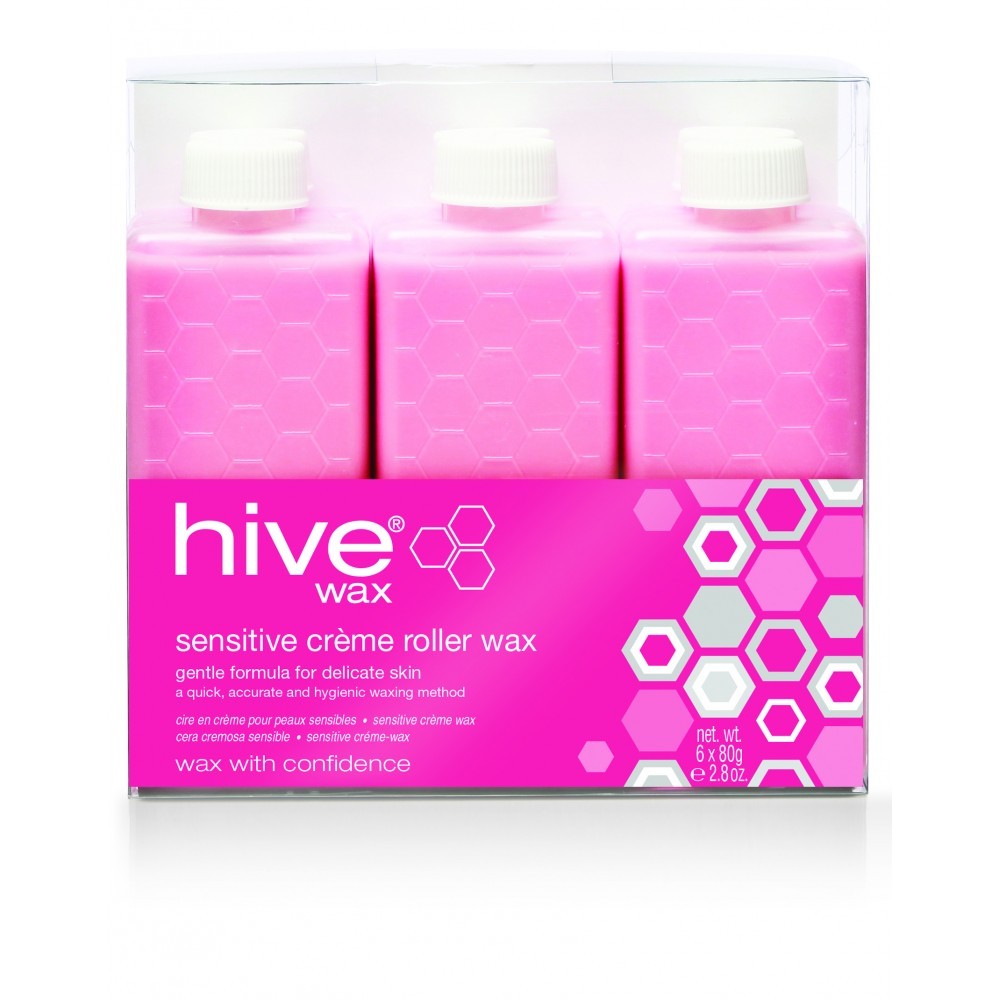
Hive Sensitive Crème Roller Wax Cartridges give fantastic waxing results with its creamy gentle wax. The roller cartridges provide a quick, accurate and hygienic method of wax application. Directly inserts into a Hive Hand-Held 80g Roller Cartridge Heater or can be used with Multi Pro Cartridge heaters (3 or 6 chamber varieties).
Features:
Ideal for use on delicate and sensitive skin.
Low operating temperature
Paraben-Free
Vegan Friendly
Cruelty-Free
6 x 80g cartridges
How to apply Sensitive Crème Wax with a Roller Cartridge:
Firstly wipe over the area to be treated with Pre-Wax Spray
Then test the Sensitive Crème Wax on your wrist to check the temperature.
Test a small patch of the wax on the client and ask them if the temperature is ok.
Roll a thin layer of Sensitive Crème Wax onto the treatment area following the hair growth direction.
Then apply a wax strip
Firmly rub over the wax strip once or twice using the palm of your hand.
Rip it off very quickly against the growth of the hair.
1. Roll the cartridges on to a wax strip to ensure the wax is heated and running through properly before you use on a client.
2. Use light application and never force the cartridge to roll on the skin.
3. Wipe away drips on the cartridge head between applications using a wax strip.
4. Keep a consistent working temperature.
5. Ensure you wipe any wax residue off the heater with wax remover.
6. You should use a new cartridge or cartridge head on each client.
8. If using a multi-chamber heater, ensure you rotate the cartridges so that they are not over-heated for an extended period of time.
Waxing FAQ:
Q: Why is the Sensitive Crème Wax too thick?
A: Check the wax’s temperature and turn the cartridge heater up as it may be too cool.
Q: Why won’t the wax strip come off?
A:
Is the wax too thick?
Did you cleanse the area first? If not there could be dirt or oil on the skin creating a barrier
Is the hair too long? – if so trim it
Have you held the skin taught enough?
Is the skin cold or dry?
Q: Why won’t the hair come out?
A:
Is the hair too long? If so trim it
Did you hold the skin taught when you applied the Sensitive Crème Wax and not just when you removed the wax?
The hairs may have been too short so remove with tweezers
Q: The skin is very Red.
A:
Check the temperature of your Sensitive Crème Wax and turn your wax cartridge heater down.
Ask the client if this is a normal skin reaction for them.
Do not keep waxing over the same area.
Q: Why is there spots of blood on the client’s skin?
A:
Blood spotting is very common with people who shave as the follicles are large and it’s a tiny amount of blood rising to the top.
Q: Why has my client got stubble a few days after waxing?
A:
Sometimes hair can be brittle and may just have broken due to no fault of yours.
Did you remove the strip in the wrong direction rather than in line with the body?
The strip should be pulled almost flat to the body and not towards the ceiling.
Stubble can appear if your client is a regular shaver, and it can take a few waxes before the stubble reduces.
Q: The skin has got purple marks on it after the strip is removed
A:
Was the hair too long?
Stretch the skin taut and position the client to maximise skin stretching.
Make sure that the Sensitive Crème Wax is applied thinly as thick wax can cause bruising.
Don’t keep going over the same area.
Q: The skin has lifted or torn
A: Apply antiseptic cream. Tell them to go to the GP if it doesn’t heal.
We value your privacy at SRF Hair and Beauty. We use cookies to optimise our website and our service.
Functional
Always active
The technical storage or access is strictly necessary for the legitimate purpose of enabling the use of a specific service explicitly requested by the subscriber or user, or for the sole purpose of carrying out the transmission of a communication over an electronic communications network.
Preferences
The technical storage or access is necessary for the legitimate purpose of storing preferences that are not requested by the subscriber or user.
Statistics
The technical storage or access that is used exclusively for statistical purposes.The technical storage or access that is used exclusively for anonymous statistical purposes. Without a subpoena, voluntary compliance on the part of your Internet Service Provider, or additional records from a third party, information stored or retrieved for this purpose alone cannot usually be used to identify you.
Marketing
The technical storage or access is required to create user profiles to send advertising, or to track the user on a website or across several websites for similar marketing purposes.

)